A calm Markdown
reader for macOS.
Cribble turns plain .md folders into a rich, connected reading workspace for macOS — local-first, private, and built for notes you already own.
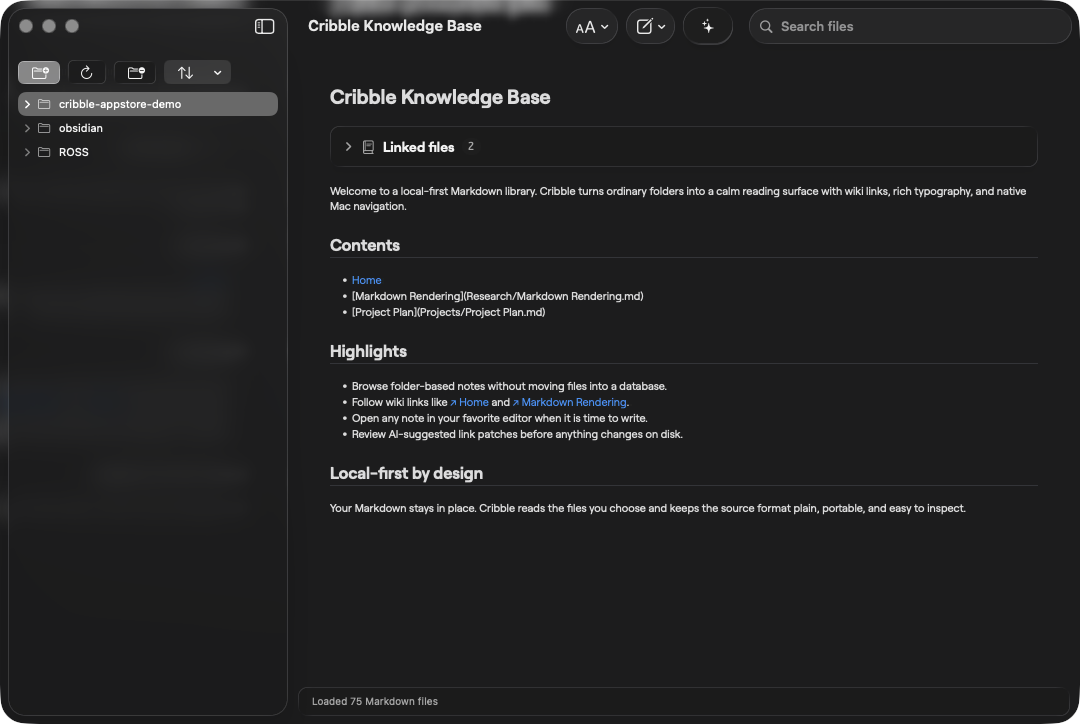
Cribble turns plain .md folders into a rich, connected reading workspace for macOS — local-first, private, and built for notes you already own.
A native Mac app — signed, notarized, and ready to go. Bring your Markdown folder, and Cribble renders it with highlights, notes, bookmarks, Mermaid, math, tables, syntax-highlighted code, and optional private AI workflows.
macOS 15 or later.
Mermaid diagrams, syntax-highlighted code blocks, math, tables, task lists, footnotes, relative images, and bundled DemoNotes are all part of the stable build.
Drop reading-position bookmarks, press H to highlight, and attach notes to highlights with a clean no-button editor.
1.4.1 keeps the simpler shortcuts, safer AI review flow, extension groundwork, and notarized AppCast-ready download.
Cribble welcomes outside contributions for bugs, docs, tests, rendering fixes, accessibility, diagnostics, and provider integrations. Product direction, official releases, app distribution, and the Cribble name stay maintainer-owned so the project keeps a clear center of gravity.
Cribble is local-first by design.
Your Markdown stays on your Mac.
Cribble doesn't require sign-up and doesn't phone home. There is no analytics SDK, no event tracking, and no usage reporting.
Cribble can only read folders you explicitly grant access to. It never scans your home directory, never reads files outside your library, and runs inside Apple's App Sandbox.
AI features are opt-in and read-only. You pick the model — your own local provider, or a service you already pay for — and Cribble shows a unified diff before a single byte touches disk.
Cribble reads the .md files you already have and saves to the same format. No proprietary database, no lock-in. Quit Cribble and your library reads identically in any text editor.
The short version: Cribble is a reader, not a service. The only data we collect is the data you wouldn't notice us collecting — which is none. Read the full privacy policy or write to adidshaft@kyokasuigetsu.xyz.
Bugs, feature ideas, or a stuck file — write directly. A real person reads every message.
Email adidshaft@kyokasuigetsu.xyz Community GitHub Issues Releases Stable builds on GitHubCribble doesn't store anything itself. It reads the folder you point it at and reads back from the same files. Use iCloud Drive, Dropbox, a git repo, or a plain local folder — Cribble doesn't care.
Yes. Cribble understands [[wiki links]] and standard Markdown, so most existing vaults open as-is. We don't modify your files unless you explicitly apply an AI suggestion.
Cribble is a reader. Use the Open in menu when you want to edit a file in another app. Highlight notes are the exception: they are small reading annotations saved by Cribble.
Cribble supports on-device models plus Claude and Codex through the command-line sessions already signed in on your Mac. You stay in control and review changes before anything is written.
The latest signed and notarized DMG is available from GitHub Releases. The direct download includes Local AI unlocked; the Mac App Store build uses a one-time Local AI unlock.
Start with GitHub Discussions for product ideas. Bugs and small fixes can go straight to GitHub Issues, while larger feature work should be discussed before coding.